
Maynor in the Cloud / Beyond the Tenant
In Behind the Prompt: The Controls That Shape What Copilot Can Use, I followed the path between a user prompt and the data Copilot can reach. That explains the control path. This article steps back and looks at the architecture that has to exist around that path.
You do not need to read the earlier article first, but the distinction matters. A control path explains how access is evaluated. An architecture explains how the controls are structured, owned, validated, and operated together.
From control path to Microsoft 365 Copilot control architecture
Copilot does not sit beside Microsoft 365 with its own independent security model. It operates inside the identity, permissions, protection, and governance already present in the tenant.
That means I would not design Copilot readiness as a checklist of product features. I would design it as a set of control layers with clear boundaries.
Each layer has a different job. Each depends on the layers around it. And no single layer can compensate for everything the others fail to do.
The five-layer control stack
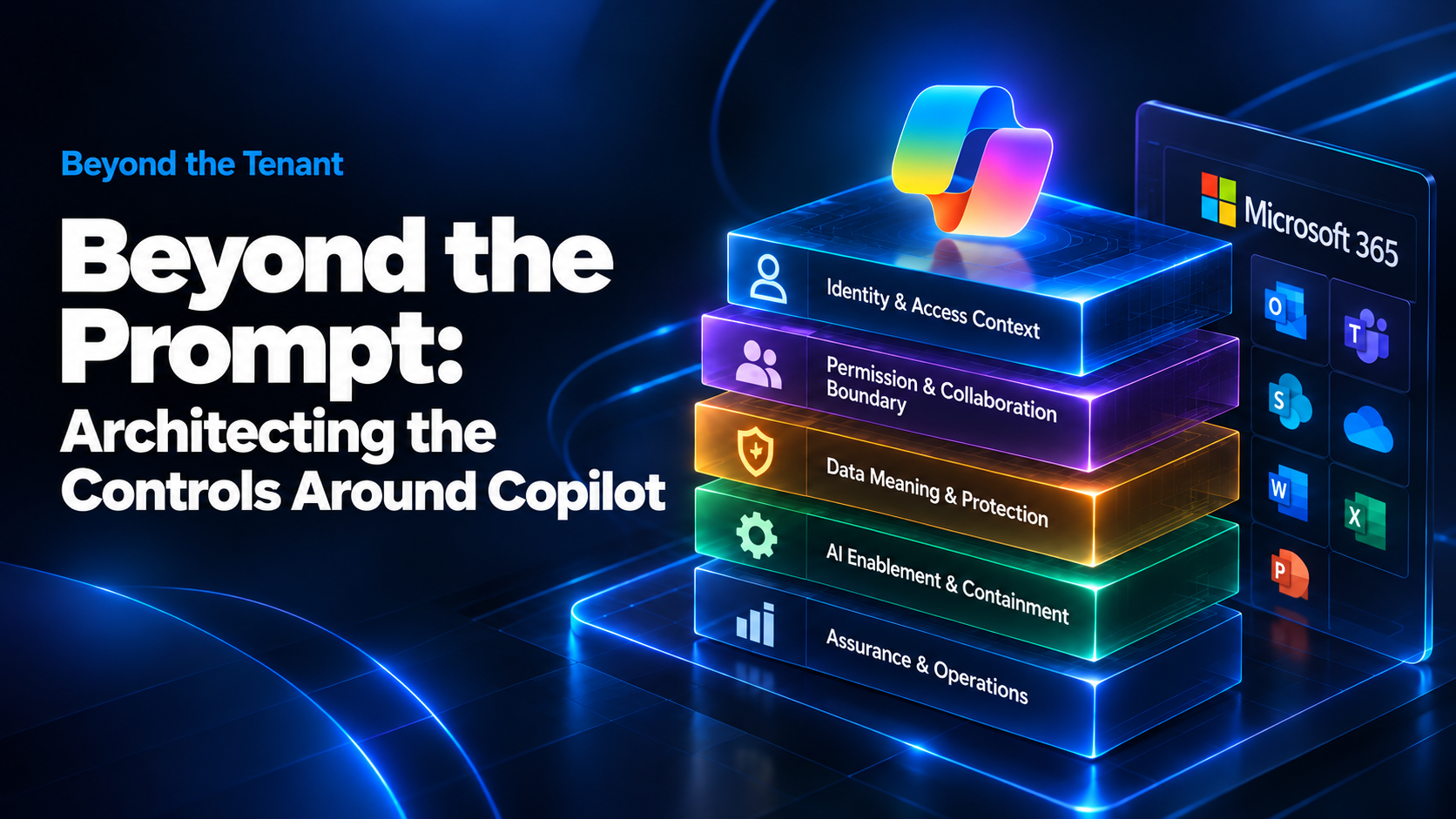
I would organize that architecture into five layers.
Figure 1. Copilot readiness is a layered Microsoft 365 control architecture operated through a continuous lifecycle.
1. Identity and Access Context
This layer answers a basic question: Can I trust the access context?
Identity assurance, MFA, Conditional Access, device state, session controls, and emergency-access design determine the conditions under which a user reaches Microsoft 365 and Copilot. Microsoft documents that Copilot honors the signed-in user’s permissions, Conditional Access, and MFA.
Microsoft Learn: Microsoft Copilot architecture and how it works
But this layer has a hard boundary. A strongly authenticated user can still have too much access.
Who the user is and the conditions under which the session is trusted.
Whether the user’s existing permissions are appropriate for the business data they can reach.
2. Permission and Collaboration Boundary
This is the effective-access layer.
SharePoint permissions, Teams and Microsoft 365 Group membership, OneDrive sharing, guests, sharing links, unique permissions, and ownership all contribute to what a user can actually reach.
The important architectural decision is not to make everything private. It is to make access intentional and owned.
This is also where business ownership becomes part of the design. IT can expose the access path. The business owner still has to decide whether that access is justified.
The collaboration and sharing boundary that determines effective access.
What the information means or whether additional usage restrictions should follow the data.
3. Data Meaning and Protection
Permissions tell me who can reach information. They do not tell me what that information is.
Sensitivity labels, encryption, DLP, and related Purview controls add classification and enforcement where the business requirement calls for it. Microsoft documents that Copilot respects sensitivity-label encryption and usage rights when interacting with protected content.
Microsoft Learn: Data protection and auditing for Microsoft 365 Copilot
The architecture still has to keep the control boundaries clear. Classification does not repair oversharing. DLP does not make an ownerless site governed. Encryption does not decide whether an existing permission should have existed in the first place.
4. AI Enablement and Containment
Copilot-specific enablement belongs here, after the foundation is understood.
This layer covers who receives Copilot, which agent and AI use cases are allowed, what temporary containment is needed, and what conditions would cause access to be narrowed or paused.
Restricted Content Discovery is a useful example. Microsoft positions it as a temporary governance control for SharePoint sites that need additional review before they become broadly discoverable through organization-wide search and Copilot. It reduces discoverability, but it does not change the site’s underlying permissions.
Microsoft Learn: Restricted Content Discovery
That makes the distinction simple:
5. Assurance and Operations
This is the layer that decides whether the architecture survives after deployment.
Audit, monitoring, investigations, exception handling, access review, validation, and expansion gates turn configuration into an operating model. Microsoft Purview records Copilot interaction events and can include the service involved and references to Microsoft 365 resources used during the interaction.
Microsoft Learn: Copilot interaction events overview
But telemetry is not governance by itself.
The stack only works as a system
The value of the model is not the five boxes. It is the dependency between them.
| Layer | Depends on | If it fails |
|---|---|---|
| Identity & access | Authentication, Conditional Access, device/session controls | A user can reach the environment under conditions the design did not intend. |
| Permissions & collaboration | Effective access, sharing governance, accountable ownership | Copilot can surface information the user is already permitted to reach even when that access is broader than intended. |
| Data meaning & protection | Usable classification, protection design, enforcement, licensing | Sensitive information can lack the controls needed after access is granted. |
| AI enablement & containment | Known control state and explicit rollout decisions | AI adoption can expand faster than the environment can support it. |
| Assurance & operations | Audit, ownership, investigation, validation, response | The organization cannot prove the controls are working or react consistently when they are not. |
That dependency is why I would not call one Microsoft feature the Copilot security control. The architecture is the combined state of the environment.
Readiness is a lifecycle, not a gate
The stack describes the control architecture. The lifecycle describes how I would move the environment through it.
Discover
Establish what actually exists. Separate configured, enforced, inferred, and unknown. Do not let a report turn an assumption into fact.
Contain
Reduce immediate exposure where needed while the structural problem is being investigated. Temporary controls belong here, with their limitations visible.
Remediate
Fix the underlying condition: permissions, ownership, sharing, identity controls, protection, governance, or operational process.
Pilot
Use the pilot as architecture validation. Test access behavior, user experience, false positives, support impact, telemetry, investigations, and exception handling.
Expand
Expansion should be a decision based on evidence. The next group moves forward because the control state supports it, not because the licenses have already been purchased.
Operate
The control state keeps changing after rollout. New sites appear. Sharing changes. Owners leave. Agents are created. Permissions drift. The architecture has to stay operational.
What I would require before expansion
I would not use one readiness score as the expansion decision. I would want evidence across the stack.
| Area | Evidence I want | Owner |
|---|---|---|
| Identity | Authentication and session requirements are enforced for the intended users. | Identity / Security |
| Permissions | High-risk access paths in scope have been reviewed or explicitly accepted. | Platform + Data owner |
| Protection | Required labels, encryption, or DLP controls are actually enforcing where intended. | Security / Information protection |
| Containment | Temporary controls have owners, limitations, and exit conditions. | AI / Platform governance |
| Audit | Copilot activity can be investigated and the operating team knows how to use the evidence. | Security / Operations |
| Operations | Exceptions, reviews, and remediation queues have accountable owners. | Business + IT operations |
Licensing changes the architecture
Licensing is not a procurement detail when it changes which controls can be enforced or operated.
If a required capability is not available, the design has to change. The defensible options are to license the capability, narrow the scope, use a compensating control, accept the residual risk, or delay the use case.
What I would not do is document a target control and then quietly implement a weaker architecture as though it were equivalent.
The architectural judgment
The control path from prompt to data matters, but that path is only one view of the system.
The deeper architecture question is whether the identity layer, access boundary, data protection model, AI enablement decisions, and operating controls reinforce each other.
If they do, Copilot can expand inside a model that is understood and supportable.
If they do not, turning on another feature does not close the gap.
Explore more: Continue with the AI & Copilot pillar for more Microsoft 365 Copilot architecture, governance, security, and production guidance.